

ModMed's API uses the OAuth 2.0 standard for authorizing API calls. To authenticate requests, an access token must be included with each API request. This token identifies your application and defines which resources (e.g., Appointments, Patients) it can access. If your application has received explicit authorization from multiple practices, you can interact with the MMI FHIR API on behalf of each.
Obtaining Authorization
OAuth 2.0 offers various grant types (or "methods") for acquiring an access token. Two mechanisms are currently supported:
- Legacy —
passwordgrant (documented below; being sunset). - New — OAuth2
client_credentials(recommended for new integrations; see New: Client Credentials below).
To obtain a token, your application sends a POST request to the appropriate authentication endpoint.
Legacy: Password Grant (being sunset)
Authentication Endpoints
Generic Sandboxes:
https://stage.ema-api.com/ema-dev/firm/{firm_url_prefix}/ema/ws/oauth2/grant
Practice Sandboxes:
https://stage.ema-api.com/ema-training/firm/{firm_url_prefix}/ema/ws/oauth2/grant
Production:
https://mmapi.ema-api.com/ema-prod/firm/{firm_url_prefix}/ema/ws/oauth2/grant
Request Parameters (Body , x-www-form-urlencoded)
grant_type: password
username: {the username provided}
password: {the password provided}
NOTE: Use Authentication Endpoint for getting token for this portal.
Example:
curl --location 'https://stage.ema-api.com/ema-dev/firm/apiportal/ema/ws/oauth2/grant' \
--header 'x-api-key: Zt9tXPIgz17uxEU6gkZPWa3ZAFhZOqm04oEDHC1f' \
--header 'Content-Type: application/x-www-form-urlencoded' \
--data-urlencode 'grant_type=password' \
--data-urlencode 'username=fhir_QfLlo' \
--data-urlencode 'password=925X3LZ505'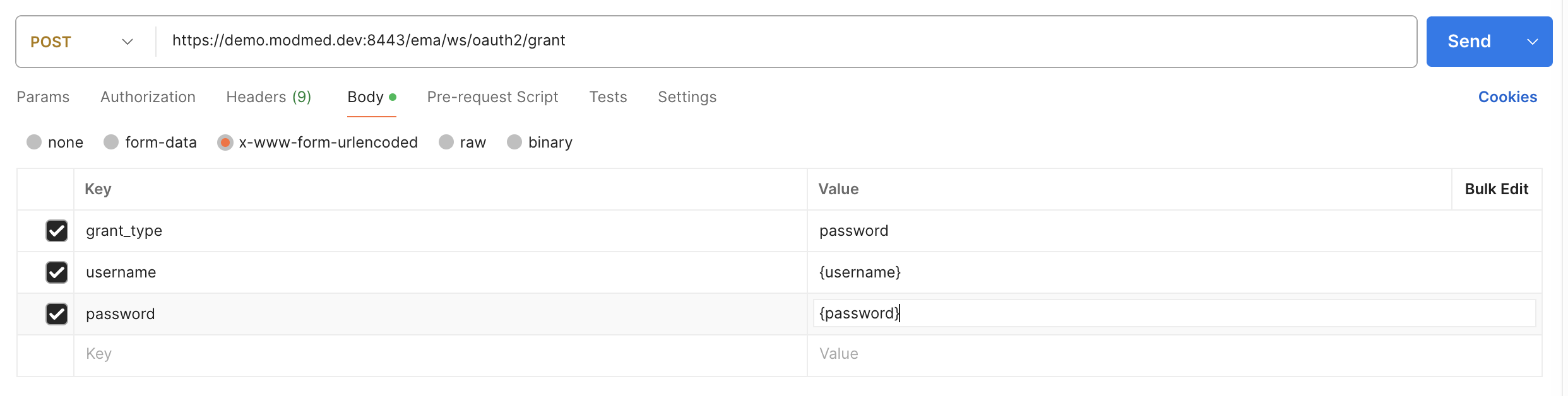
Once you make the POST, you should get both the Access token and the Refresh tokens returned to you similar to the example here (the values are intentionally obfuscated):
Sample Return:
{
"scope": "emapmsandbox01",
"token_type": "Bearer",
"access_token":
"eyJ0eXAiOiJKV1QiLCJhbGciOiJIUzI1NiJ9.eyJzdWIiOiJmaGlyX2lEdm1aIiwidXJsUHJlZml4IjoiZGVybXBtc2FuZGJveDQ5IiwidmVuZ
G9yIjoiZmhpcl9p…..",
"refresh_token":
"eyJ0eXAiOiJKV1QiLCJhbGciOiJIUzI1NiJ9.eyJzdWIiOiJmaGlyX2lEdm1aIiwidXJsUHJlZml4IjoiZGVybXBtc2FuZGJveDQ5IiwiaXNzIjo
ibW9kbWVkIiwidG9rZW5……..."
}
Once you have the Access Token, you will use that in each of the calls to the API. You can use the Refresh Token to obtain additional Access Tokens:
Example:
curl -X POST \
https://stage.ema-api.com/ema-dev/firm/emapmsandbox01/ema/ws/oauth2/grant \
-H 'Content-Type: application/x-www-form-urlencoded' \
-H 'Postman-Token: 7c553cdc-78bd-4548-b221-f2b32dd50c82' \
-H 'cache-control: no-cache' \
-H 'x-api-key: Zt9tXPIgz17uxEU6gkZPWa3ZAFhZOqm04oEDHC1f' \
-d
'grant_type=refresh_token&refresh_token=eyJ0eXAiOiJKV1QiLCJhbGciOiJIUzI1NiJ9.eyJzdWIiOiJmaGlyX2lEdm1aIiwidXJsUHJlZml
4IjoiZGVybXBtc2FuZGJveDQ5IiwiaXNzIjoibW9kbWVk……………………………….OSC9NtWqqwAMzSlI'
At which point, you will get back something like:
{
"scope": "emapmsandbox01",
"token_type": "Bearer",
"access_token":
"eyJ0eXAiOiJKV1QiLCJhbGciOiJIUzI1NiJ9.eyJzdWIiOiJmaGlyX2lEdm1aIiwidXJsUHJlZml4IjoiZGVybXBtc2FuZGJveDQ5IiwidmVuZ
G9yIjoiZmhpcl9pRHZtWkBkZXJtcG1zYW5kYm94NDkiLCJpc3MiOiJtb2RtZWQiLCJ0b2tlblR5cGUiOiJhY2Nlc3MiLCJwb2wiOiJjaGF
uZ2VtZSIsImp0aSI6ImQ5NDc4ND………….",
"refresh_token":
"eyJ0eXAiOiJKV1QiLCJhbGciOiJIUzI1NiJ9.eyJzdWIiOiJmaGlyX2lEdm1aIiwidXJsUHJlZml4IjoiZGVybXBtc2FuZGJveDQ5IiwiaXNzIjo
ibW9kbWVkIiwidG9rZW5UeXBlIjoicmV………………………...MzSlI"
}
Note: The refresh token will remain the same as what you sent in your POST.
Once you have the Access Token, you will use that in each of the calls to the API. For example, if you were making a GET call for a Patient, it would look something like this:
curl -X GET \
https://stage.ema-api.com/ema-dev/firm/emapmsandbox01/ema/fhir/v2/Patient \
-H 'Authorization: Bearer
eyJ0eXAiOiJKV1QiLCJh……………………..GQ1Nzk2NTRjNGViOWJhYTdkZjY2NjBkNjdiIn0.WcuidhExBqQu7zlX1cQhD12JicoVpD
HouU_bvV_qWvA' \
-H 'Postman-Token: ce2d75cb-48f2-431f-b70e-007ceff4ad1e' \
-H 'cache-control: no-cache' \
-H 'x-api-key: Zt9tXPIgz17uxEU6gkZPWa3ZAFhZOqm04oEDHC1f'
New: Client Credentials
New integrations should authenticate with the OAuth 2.0 client_credentials grant directly against the OAuth2 token endpoint, using the client_id and client_secret provisioned for your vendor application. This is the target mechanism as the legacy password grant is sunset.
Token Endpoints
Sandbox:https://ssoqa01-lb-01.m2qa.com/auth/realms/ema-fhir/protocol/openid-connect/token
Production:https://sso.ema.md/auth/realms/ema-fhir/protocol/openid-connect/token
Required header: x-api-key — this token request itself requires the x-api-key header, in addition to the FHIR calls that follow it. This is easy to miss since it isn't part of the request body. Use the x-api-key provisioned for your client_credentials vendor application; this is a different value than the shared key documented above for the legacy password grant. Omitting it here still returns a 200 with a valid-looking token, but every downstream FHIR call then fails.
Request Parameters (Body, x-www-form-urlencoded)
grant_type: client_credentials
client_id: {your client_id}
client_secret: {your client_secret}
Example:
curl --location 'https://ssoqa01-lb-01.m2qa.com/auth/realms/ema-fhir/protocol/openid-connect/token' \
--header 'x-api-key: {your client_credentials x-api-key}' \
--header 'Content-Type: application/x-www-form-urlencoded' \
--data-urlencode 'grant_type=client_credentials' \
--data-urlencode 'client_id={your client_id}' \
--data-urlencode 'client_secret={your client_secret}'
The response is an OAuth2 token. Key differences from the legacy flow: the access_token is an RS256-signed JWT, the scope is a space-separated list of ACLs, and no refresh_token is returned — request a new token when the current one expires.
Sample return:
{
  "access_token": "<RS256 JWT>",
  "expires_in": 900,
  "refresh_expires_in": 0,
  "token_type": "Bearer",
  "not-before-policy": 0,
  "scope": "acl/enc_s acl/pat_s_name_dob_gen"
}
Use the access token on each API call exactly as with the legacy flow — Authorization: Bearer <token> together with your x-api-key. Note: the x-api-key value itself is not shared across flows — the key provisioned for your client_credentials vendor application is different from the one used with the legacy password grant. If you're switching an existing integration from legacy to client_credentials, you'll need to swap both the token and the x-api-key value it's paired with.