

MMI has developed functionality that allows 3rd party vendors to send structured data to the Clipboard. Currently, Problem List (and other Condition-based sections — see Routing Conditions to Other Clipboard Sections below), Medications, Allergies, Family History, and Past/Ocular Surgical History (via the Procedure resource) are supported. However, we will be adding support for other elements of the clipboard in the near future.
User Experience
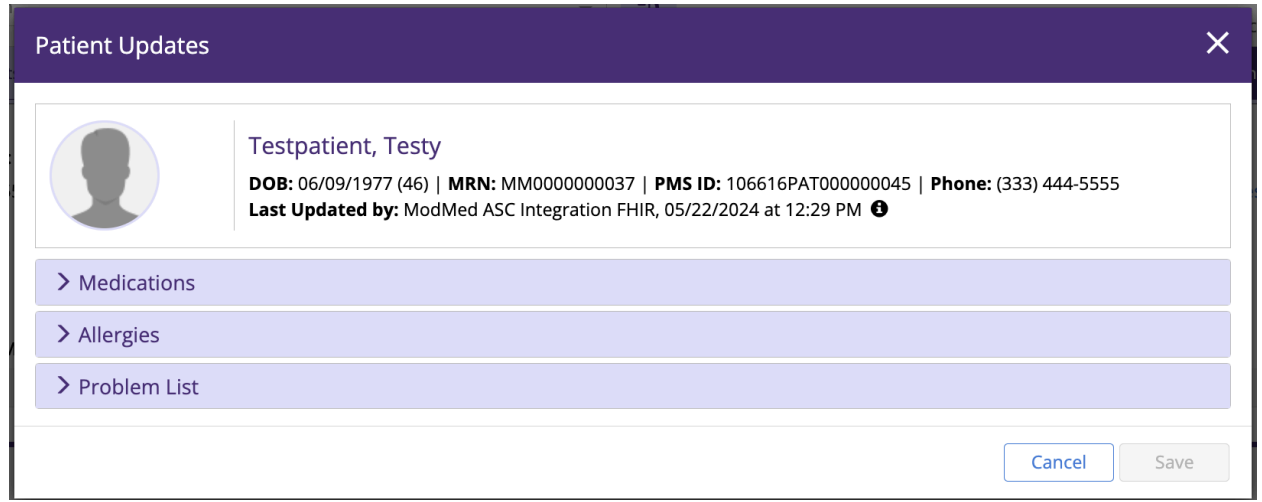
When a vendor POSTs something new to a Patient, an EMA user will see a modal pop up the next time
they visit that Patient’s chart:
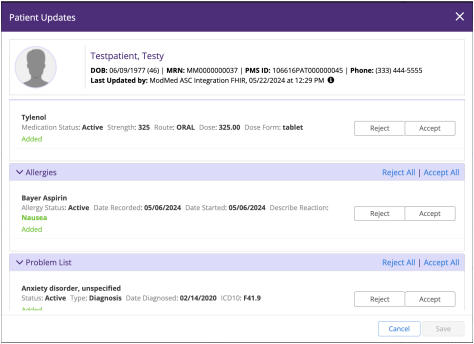
From there, any of the new items can either be individually reconciled or all can be accepted or rejected
at once:
The following sections of the clipboard can be updated and a sample payload is provided for each type:
Problem List
{
  "resourceType": "Condition",
  "clinicalStatus": {
    "coding": [
      {
        "system": "http://hl7.org/fhir/ValueSet/condition-clinical",
        "code": "ACTIVE",
        "display": "Active"
      }
    ],
    "text": "Active"
  },
  "category": [
    {
      "coding": [
        {
          "system": "{base url}/{firm_url_prefix}/ema/fhir/v2/ValueSet/condition-category",
          "code": "DIAGNOSIS",
          "display": "Diagnosis"
        }
      ],
      "text": "Diagnosis"
    }
  ],
  "code": {
    "coding": [
      {
        "system": "ICD10",
        "code": "F41.9",
        "display": "Anxiety Disorder, Unspecified"
      }
    ],
    "text": "Anxiety Disorder, Unspecified"
  },
  "subject": {
    "reference": "{base url}/{firm_url_prefix}/ema/fhir/v2/Patient/23715679",
    "display": "{base url}/{firm_url_prefix}/ema/fhir/v2/Patient/23715679"
  },
  "onsetDateTime": "2020-02-14T10:21:14+00:00",
  "recordedDate": "2020-02-14T15:21:14+00:00"
}
This is the default clipboard section for a Condition — see Routing Conditions to Other Clipboard Sections below for how to send a Condition to a different section, like Past Medical History or Ocular History.
Allergies
{
  "resourceType": "AllergyIntolerance",
  "clinicalStatus": {
    "coding": [
      {
        "system": "https://www.hl7.org/fhir/valueset-allergyintolerance-clinical.html",
        "code": "active",
        "display": "Active"
      }
    ],
    "text": "Active"
  },
  "code": {
    "coding": [
      {
        "system": "RxNorm",
        "code": "211874",
        "display": "Bayer Aspirin"
      }
    ],
    "text": "Bayer Aspirin"
  },
  "patient": {
    "reference": "{base url}/{firm_url_prefix}/ema/fhir/v2/Patient/23715679",
    "display": "{base url}/{firm_url_prefix}/ema/fhir/v2/Patient/23715679"
  },
  "onsetDateTime": "2024-05-06T00:00:00+00:00",
  "recordedDate": "2024-05-06T00:00:00+00:00",
  "reaction": [
    {
      "substance": {
        "coding": [
          {
            "system": "RxNorm",
            "code": "211874",
            "display": "Bayer Aspirin"
          }
        ],
        "text": "Bayer Aspirin"
      },
      "manifestation": [
        {
          "coding": [
            {
              "system": "SNOMED CT",
              "code": "422587007",
              "display": "Nausea"
            }
          ],
          "text": "Nausea"
        }
      ],
      "description": "Nausea"
    }
  ]
}
Medications
{
  "resourceType": "MedicationStatement",
  "status": "active",
  "medicationCodeableConcept": {
    "coding": [
      {
        "system": "RxNorm",
        "code": "209387",
        "display": "Tylenol"
      }
    ],
    "text": "Tylenol"
  },
  "subject": {
    "reference": "{base url}/{firm_url_prefix}/Patient/73337",
    "display": "{base url}/{firm_url_prefix}/ema/fhir/v2/Patient/73337"
  },
  "dosage": [
    {
      "route": {
        "coding": [
          {
            "system": "FDA RouteOfAdministration",
            "code": "C38288",
            "display": "ORAL"
          }
        ],
        "text": "ORAL"
      },
      "doseAndRate": [
        {
          "doseQuantity": {
            "value": 325
          }
        }
      ]
    }
  ]
}
Family History
{
  "resourceType": "FamilyMemberHistory",
  "status": "partial",
  "patient": {
    "reference": "{base url}/{firm_url_prefix}/ema/fhir/v2/Patient/23715679",
    "display": "{base url}/{firm_url_prefix}/ema/fhir/v2/Patient/23715679"
  },
  "date": "2015-11-10T15:46:09+00:00",
  "relationship": {
    "coding": [
      {
        "system": "SNOMED CT",
        "code": "66839005",
        "display": "FATHER"
      }
    ],
    "text": "FATHER"
  },
  "condition": [
    {
      "code": {
        "coding": [
          {
            "system": "SNOMED CT",
            "code": "160250007",
            "display": "No family history of malignancy (situation)"
          }
        ],
        "text": "No family history of malignancy (situation)"
      }
    }
  ]
}
Routing Conditions to Other Clipboard Sections
By default, a Condition lands in Problem List. You can route it to a different clipboard section instead by including an identifier on the Condition with system set to condition-type and value set to one of the supported section codes — see the Condition page for the full list of section codes and detailed CREATE/UPDATE behavior (including how routing works differently on update, and what happens if an unrecognized or missing code is sent).
Reconciliation
Items sent to the Clipboard require Practice staff to reconcile (accept or reject) them before they're added to the Patient's chart. Your CREATE response confirms the item was received and is pending reconciliation — for example:
{
  "resourceType": "OperationOutcome",
  "issue": [
    {
      "severity": "information",
      "code": "informational",
      "diagnostics": "Condition saved. Reconciliation Pending."
    }
  ]
}
There is currently no way to check reconciliation status after the fact. A rejected item is indistinguishable from an id that never existed or was mistyped — both return the same generic "not valid" error on read. Don't build vendor workflows that depend on detecting rejection via a later GET.