

Appointments
Base profile: http://hl7.org/fhir/StructureDefinition/Appointment
When scheduling an appointment, it’s essential to understand that an appointment can only be booked if there is a valid Slot available. Slots are configured based on the practice’s calendar settings. Different providers may have varying appointment durations for the same appointment type.
To successfully book an appointment, the following details are required:
- Appointment Type
- Location
- Provider
- Patient
- Date/Time
- Duration
When querying available slots, providing just the Appointment Type is the minimum requirement. However, because each practice may configure its calendar differently, it’s recommended to include additional details like at least one Practitioner, one Location, and a date/time range for more accurate results.
Appointment API Information
Base URL: {base_url}/{firm_url_prefix}/ema/fhir/v2/Appointment
Appointment Type ValueSet:
{base_url}/{firm_url_prefix}/ema/fhir/v2/ValueSet/appointment-type
- Appointment types are configured at the firm level and can be found by referencing the firm-specific appointment-type ValueSet.
- This ValueSet only returns active appointment types. If an expected type is missing, it may have been set to inactive.
Reportable Reason ValueSet:
{base_url}/{firm_url_prefix}/ema/fhir/v2/ValueSet/reportable-reason
- Similarly, reportable reasons are configured at the firm level. Use the firm-specific reportable-reason ValueSet to find these reasons.
Cancellation Reason ValueSet:
{base_url}/{firm_url_prefix}/ema/fhir/v2/ValueSet/appointment-cancellation-reason
Common Use Cases
- Retrieve all appointments for a practice
- Find a specific appointment
- Create a new appointment
- Update the status of an appointment
The following attributes are supported:
| Field Name | Notes |
|---|---|
| id | The MMI-specific unique identifier for the Appointment |
| status | FHIR supports the following statuses: These statuses are mapped as follows in ModMed’s Practice Management System UI: |
| cancelationReason | {baseurl}/{firm_url_prefix}/ema/fhir/v2/ValueSet/appointment-cancellation-reason |
| appointment type | Appointment Type ValueSet: {baseurl}/{firm_url_prefix}/ema/fhir/v2/ValueSet/appointment-type |
| reasonCode | Reportable Reason Value Set: {baseurl}/{firm_url_prefix}/ema/fhir/v2/ValueSet/reportable-reason |
| description | Free text field that is mapped to the “Reason for Visit” field in MMPM. Max length for description is 100 characters |
| supportingInformation | identifier: NEW_PATIENT (true/false) boolean |
| comment | Free Text field that is mapped to the “Appointment Notes” field in MMPM Max length for comment is 2048 characters |
| start | Start Time and Date for the appointment |
| end | End time and date for the appointment |
| minutesDuration | Duration of the appointment in minutes |
| created | Date and time the appointment was created |
| participant | References to the Actors for the appointment:
|
The Following Operations are supported:
- Appointment READ
- Appointment SEARCH
- Appointment CREATE
- Appointment UPDATE
Appointment CREATE
The minimum attributes for creating an appointment are:
| Name | Type | Description |
|---|---|---|
| participant | reference |
|
| appointmentType | ValueSet | Appointment Type ValueSet: {baseurl}/{firm_url_prefix}/ema/fhir/v2/ValueSet/appointment-type |
| start | datetime | start time and date for the appointment |
| end | datetime | end time and date for the appointment |
| minutesDuration | integer | Duration of the appointment in minutes |
| status | code | FHIR supports the following statuses: These statuses are mapped as follows in Modernizing Medicine’s Practice Management System UI: |
The payload of appointment create would generate this experience when someone at the practice went to view the created appointment:
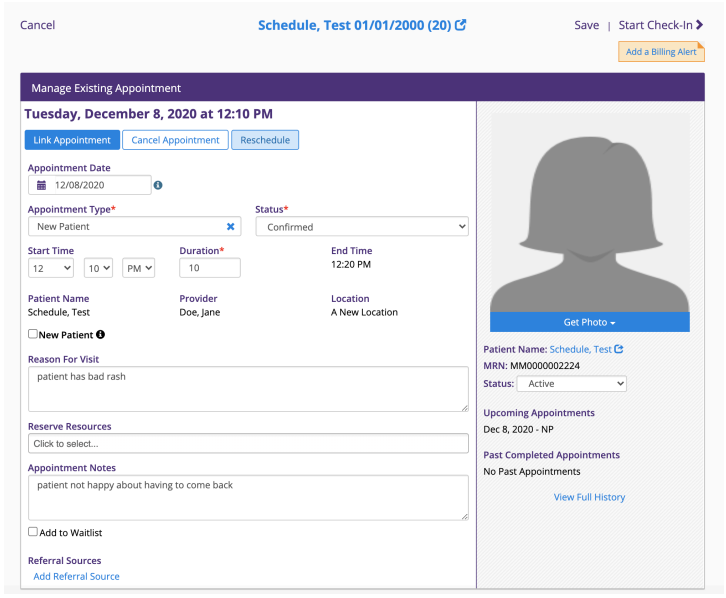
When creating Appointments users will also be able to push ‘Referring Provider’ as well as ‘Referral Source’ data within the context of the Appointment. This data would be sent within the ‘supportingInformation’ field.
| Name | Description |
|---|---|
| supportingInformation | identifier: NEW_PATIENT (true/false) boolean Reference to Practitioner(referring Provider) or Reference to Organization(Referring Institution). Referral-Source identifier which is a ValueSet |
Appointment UPDATE
Fields accepted for updating an appointment are:
| Name | Type | Description |
|---|---|---|
| description | string | updates the “reason for visit” field in MMPM |
| minutesDuration | string | updates the duration of an appointment |
| start | datetime | |
| end | datetime | |
| status | code | FHIR supports the following statuses: These statuses are mapped as follows in Modernizing Medicine’s Practice Management System UI: |
| reportableReason | string | |
| description | string | |
| supportingInformation | identifier | identifier: NEW_PATIENT (true/false) boolean |
| comment | string | |
| cancelationReason | code | {baseurl}/{firm_url_prefix}/ema/fhir/v2/ValueSet/appointment-cancellation-reason |